01
AliExpress product discovery
Search supplier products in one focused workspace, then keep the ones worth reviewing.

Connect AliExpress sourcing, supplier mapping, stock monitoring, and order management in one streamlined workspace.
Built around your Shopify store and supplier workflows on AliExpress.
Product discovery
Search supplier products, review available product details and shipping information, then add suitable items to your Import List.
See the workflow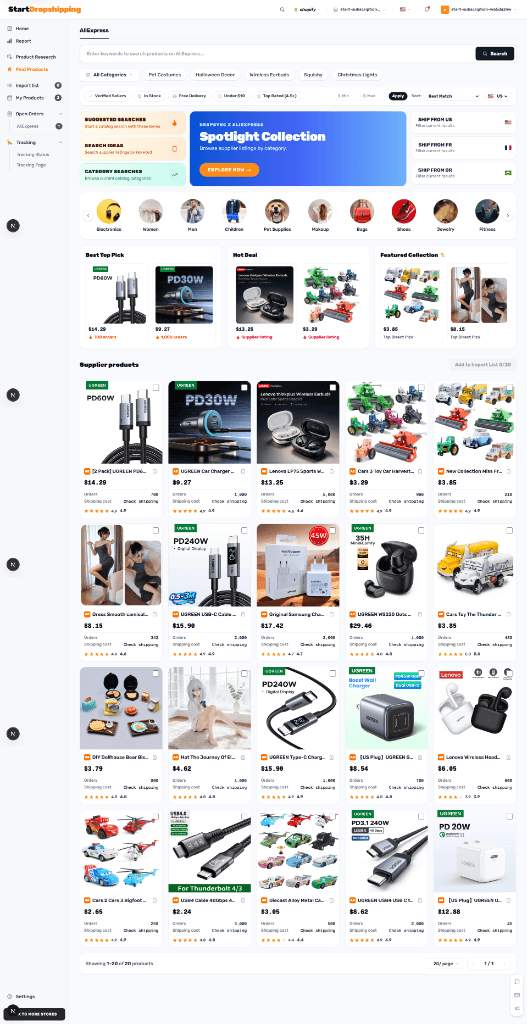
Import list
Map supplier variants
Publish with context
Keep products in your Import List while you review their content and choices. Map supplier options to store variants, then use the existing Shopify publishing flow when you are ready.
Manual control with visibility
Manual refreshes and workflow state changes give merchants timely context. Decisions and recovery steps remain visible instead of being hidden behind automatic actions.
Manual inventory refresh
Check supported supplier availability when you need it.
Manual price refresh
Review supplier cost changes before updating store decisions.
Merchant-controlled recovery
Failures retain context for safe correction and retry.
[09:32:07] Mapping validation started for selected supplier variant
[09:32:08] OK Inventory state returned for mapped SKU
[09:32:09] ALERT Supplier cost has changed; merchant review queued
[09:32:11] INFO Shopify product remains unchanged until a merchant confirms
[09:32:13] SYNC Order status refreshed in the operations workspace
Order management
Follow a Shopify customer order through supplier placement, buyer-account payment handoff, verification, tracking, and fulfillment status.
Orders workspace
Illustrative order state preview
Customer order received
Mapped items checked
Pay in AliExpress account
Tracking refreshes when supplied
After shipment verification
Operational capabilities
A connected system for the actual workflows merchants need to inspect, control, and keep moving.
01
Search supplier products in one focused workspace, then keep the ones worth reviewing.
02
Connect store options to supplier SKUs before fulfillment decisions are made.
03
Move reviewed products from Import List to your Shopify store with clear controls.
04
Revalidation highlights supplier availability changes across your active mappings.
05
See supplier-side cost shifts in context before they affect your product decisions.
06
Follow order placement, payment handoff, shipment, and fulfillment states.
How it works
Use the existing connection flow to link your store and enter the merchant workspace.
Review supplier products and build an Import List before making them store products.
Connect supplier variants to store options, then keep an eye on mapping changes.
Review supplier placement, buyer payment handoff, and shipment progress in order workflows.
FAQ
You begin the existing Shopify connection flow. After your store is connected, you can access the merchant workspace to discover products, manage the import list, and review order operations.
No. Product discovery and review are available in the workspace. A merchant-owned AliExpress buyer connection is required when an order needs supplier placement or payment handoff.
No. Products enter the Import List first. You can review product content, supplier variants, and store settings before choosing to push them to Shopify.
You can refresh supported supplier details manually. Changes are shown for merchant review so you can make an informed store decision.
Start the Shopify connection flow, then enter a workspace designed to keep product and order operations visible at every step.